Showing posts with label Basic. Show all posts

Thursday, 18 October 2018

Conversion of lowercase alphabet to uppercase or vice versa in C++

ASCII value/code


A computer is a digital device so it converts data & instructions into binary bits before performing any operation on it. The binary bits are generated by the encoder according to the character encoding standard. The binary bits may vary depending on the encoding standard used. The two most commonly used character encoding standards are ASCII and EBCDIC. Both the encoding standard have their own unique binary code for each character.

ASCII stands for American Standard Code for Information Interchange and is the most popular character encoding standard used for electronic communication (i.e. information interchange or transfer in electronics). In this standard, 128 characters are numerically encoded with a unique 7-bit binary combination known as 7-bit ASCII value. All the operations and processing within a digital system are performed on these binary combinations. But the decimal equivalent of the corresponding  7-bit binary codes is generally considered as ASCII values. Some of the characters with ASCII value and 7-bit ASCII value are given below.   

Character                    ASCII value                    7-bit ASCII
a                                   97                                    1100001
b                                   98                                    1100010
y                                   121                                  1111001
z                                   122                                  1111010
A                                   65                                   1000001
B                                   66                                   1000010
Y                                   88                                   1011001
Z                                   89                                   1011010
7                                   55                                    0110111
LF(Line feed)               10                                    0001010
                                                                                           FULL TABLE

From the table, we can observe that the ASCII value of any lowercase alphabet and the same uppercase alphabet differ by 32.
i.e.
               ASCII value of any uppercase alphabet + 32 = ASCII value of same lowercase alphabet

Example:
               ASCII value of 'B' + 32 = ASCII value of 'b'
                                       66 + 32 = 98


Write a program in C++ to input an alphabet from the user. If the entered character is in uppercase then convert it into lowercase or vice versa.


In this program, we input an alphabet from the user. We check the form(uppercase or lowercase) of the alphabet by comparing its ASCII value. If the entered alphabet is in uppercase we obtain the lowercase by adding 32 to the ASCII value. And if the entered alphabet is in lowercase we obtain the uppercase by subtracting 32 to the ASCII value. Then we display the alternative form of the alphabet.


PROGRAM


#include<iostream.h>
#include<conio.h>
void main()
{
char a;
clrscr();
cout<<"Enter an alphabet either in uppercase or lowercase=";
cin>>a;
if((a>=65)&&(a<=90))
{
a=a+32;
cout<<"\nLowercase="<<a;
}
else if((a>=97)&&(a<=122))
{
a=a-32;
cout<<"\nUppercase="<<a;
}
else
cout<<"\nInvalid input";
getch();
}


OUTPUT

Conversion of cases using ASCII value
PROGRAM TO FIND ALTERNATE CASE OF AN ALPHABET


EXPLANATION

In the program, 'r' is the entered alphabet whose ASCII value is 114. The alphabet is in lowercase so the second condition of the if....else if statement is true. The following expression is executed.

ASCII value of 'r' - 32 = 114-32
                                      = 82 (which is the ASCII value of 'R')

Finally, 'R' which is in uppercase was printed on the output screen.


Friday, 12 October 2018

Printing uppercase and lowercase alphabets in C++

English alphabet

Alphabets are the set of codes that enable written communication. English alphabets are the basic constituent of the English language. They are symbols or letters with a specific sound and are used in the formation of words in the English language. The English language contains 26 alphabets out of which 5 are vowels and 21 are consonants. The uppercase and lowercase are the two forms of the English alphabet. Commonly, uppercase letters are known as capital letters whereas lowercase letters are known as small letters.

Write a program in C++ to print the uppercase and lowercase form of all English alphabets.

In this program, we assign two character variables with 'a' and 'A' as their initial value. We will use the post-increment operator(++) to generate the successive alphabets till 'z' and 'Z'. We will use a for loop to print all the alphabets.


Program


#include<iostream.h>
#include<conio.h>
void main()
{
int n;
char capital='A',small='a';
clrscr();
for(n=1;n<=26;n++)
     {
     cout<<capital++<<small++<<"\t";
     }
getch();
}


Output


Program to A to Z
PRINTING UPPERCASE AND LOWER CASE ALPHABETS


Explanation

In the program, the for loop will be executed as follows:

n(1 to 26)             capital             small             Output screen
1                           A                      a                     Aa
2                           B                      b                     Bb
3                           C                      c                     Cc
.                            .                        .                      .
.                            .                        .                      .
.                            .                        .                      .
26                         Z                      z                     Zz

The post-increment operator will alter the value of variables(capital++ and small++) only after their values are printed. In this way, we obtain our required output on the screen.


Sunday, 7 October 2018

Pre-decrement and Post-decrement operator in C++

Decrement operator


The decrement operator(--) is a unary operator which decreases the value of operand by one(1). It is used to abbreviate the assigning of variable's decreased value (by 1) to the same variable i.e. a-- means a=a-1.

Unary operators are those operators which perform an operation upon one operand to produce a new value.

The decrement operator can be utilized in two different ways, depending on whether the operator is written before or after the operand.

Pre-decrement operator
If the decrement operator precedes the operand, then it is called the pre-decrement operator(E.g. --a). The value of operand will be decremented before its value is utilized in the expression.
Example:
y= --a;   means   a=a-1;   and   y=a;   will be executed serially.
First, the value of a will be decremented, then it will be assigned to y.

Post-decrement operator
If the decrement operator follows the operand, then it is called the post-decrement operator(E.g. a--). The value of operand will be decremented after its value is utilized in the expression.
Example:
y=a--;   means   y=a;   and   a=a-1; will be executed serially.
First, the value of a will be assigned to y, then it will be decremented.

Write a program in C++ to give an idea about the pre-decrement and post-decrement operator.

In this program, we perform different operations using pre-decrement and post-decrement operator. We will input a number from the user and the altered values due to pre-decrement and post-decrement operator will be printed.


Program


1    #include<iostream.h>
2    #include<conio.h>
3    void main()
4    {
5    int a,y;
6    clrscr();
7    cout<<"Enter a value in a= ";
8    cin>>a;
9    cout<<endl<<"a= "<<a<<endl;
10  y=a--;
11  cout<<"y= a--= "<<y<<endl;
12  cout<<"a= "<<a<<endl;
13  y=--a;
14  cout<<"y= --a= "<<y<<endl;
15  cout<<"a= "<<a<<endl;
16  cout<<"a--= "<<a--<<endl;
17  cout<<"--a= "<<--a<<endl;
18  a--;
19  cout<<"a--"<<endl<<"a= "<<a<<endl;
20  getch();
21  }


Output


Decrement operator in C++
USE OF DECREMENT OPERATOR IN C++


Explanation

In this program, the user enters 5 as the input number(i.e. a=5). The remaining part of the program will be executed as follows:

Line number                        Action                                                               Output
9                                            Value of a(i.e. 5) is printed.                               5
10                                          y=a-- i.e. y=5 and a=5-1=4                                           
11                                          Value of y(i.e. 5) is printed.                               5
12                                          Value of a(i.e. 4) is printed.                               4
13                                          y= --a i.e. a=4-1=and y=3                         
14                                          Value of y(i.e. 3) is printed.                               3
15                                          Value of a(i.e. 3) is printed.                               3                                   
16                                          Value of a-- is printed i.e. the value
                                              of a(i.e. 3) is printed and  a=3-1=2.                   3                                    
17                                          Value of --a is printed i.e. a=2-1=
                                              and the value of a(i.e. 1) is printed.                   1       
18                                          a-- i.e. a=1-1=0                                         
19                                          Value of a(i.e. 0) is printed.                               0   

In this way, the statements are executed and we obtain our required output on the screen.        


Pre-increment and Post-increment operator in C++

Increment operator


The increment operator(++) is a unary operator which increases the value of operand by one(1). It is used to abbreviate the assigning of variable's increased value (by 1) to the same variable i.e. a++ means a=a+1.

Unary operators are those operators which perform an operation upon one operand to produce a new value.

The increment operator can be utilized in two different ways, depending on whether the operator is written before or after the operand.

Pre-increment operator
If the increment operator precedes the operand, then it is called the pre-increment operator(E.g. ++a). The value of operand will be incremented before its value is utilized in the expression.
Example:
y=++a;     means   a=a+1; and y=a; will be executed serially.
First, the value of a will be incremented, then it will be assigned to y.

Post-increment operator
If the increment operator follows the operand, then it is called the post-increment operator(E.g. a++). The value of operand will be incremented after its value is utilized in the expression.
Example:
y=a++;     means   y=a; and a=a+1; will be executed serially.
First, the value of a will be assigned to y, then it will be incremented.

Write a program in C++ to give an idea about the pre-increment and post-increment operator.

In this program, we perform different operations using pre-increment and post-increment operator. We will input a number from the user and the altered values due to pre-increment and post-increment operator will be printed.


Program


1    #include<iostream.h>                                                                                                          
2    #include<conio.h>                                                                                                                    
3    void main()                                                                     
4    {                                                                             
5    int a,y;                                                                           
6    clrscr();                                                                         
  cout<<"Enter a number= ";
8    cin>>a;
  cout<<endl<<"a= "<<a<<endl;
10  y=a++;
11  cout<<"y= a++= "<<y<<endl;
12  cout<<"a= "<<a<<endl;
13  y=++a;
14  cout<<"y= ++a= "<<y<<endl;
15  cout<<"a= "<<a<<endl;
16  cout<<"a++= "<<a++<<endl;
17  cout<<"++a= "<<++a<<endl;
18  a++;
19  cout<<"a++"<<endl<<"a= "<<a<<endl;
20  getch();
21  }


Output


Increment operator in C++
USE OF INCREMENT OPERATOR IN C++


Explanation

In this program, the user enters 5 as the input number(i.e. a=5). The remaining part of the program will be executed as follows:

Line number                        Action                                                               Output
9                                            Value of a(i.e. 5) is printed.                               5
10                                          y=a++ i.e. y=5 and a=5+1=6                                             
11                                          Value of y(i.e. 5) is printed.                               5
12                                          Value of a(i.e. 6) is printed.                               6
13                                          y=++a i.e. a=6+1=7 and y=7                         
14                                          Value of y(i.e. 7) is printed.                               7
15                                          Value of a(i.e. 7) is printed.                               7                                   
16                                          Value of a++ is printed i.e. the value
                                              of a(i.e. 7) is printed and  a=7+1=8.                  7                                     
17                                          Value of ++a is printed i.e. a=8+1=9  
                                              and the value of a(i.e. 9) is printed.                   9       
18                                          a++ i.e. a=9+1=10                                         
19                                          Value of a(i.e. 10) is printed.                             10   

In this way, the statements are executed and we obtain our required output on the screen.            


Thursday, 4 October 2018

Finding out the minimum number among an array of n numbers in C++

Static and dynamic data structure


A data structure whose size cannot be changed at the run-time is called static data structure. The size of a static data structure can neither be increased nor decreased at run-time. It may lead to the wastage or shortage of memory locations.

An array is an example of a static data structure. Once the size of an array is declared it can't be changed. If we declare an array of size 5 then we can't increase or decrease its size during run-time. If we utilize only 2 locations then the remaining memory is wasted. This problem is addressed by the introduction of the dynamic data structure.

A data structure whose size can be changed at the run-time is called dynamic data structure. The size of a dynamic data structure can either be increased or decreased at run-time. It prevents the wastage or shortage of memory locations.


Write a program in C++ to input an array of numbers and find the minimum number among it.


In the program, we input n numbers from the user and store it in the form of an array. Then we assign the value of the first element of an array to an extra variable. The extra variable is compared with all elements of the array starting from the second element. If any number in the array is smaller than the extra variable then the smaller value is assigned to the extra variable. This process is executed for all values of the array and we get the minimum number.


Program


#include<iostream.h>
#include<conio.h>
void main()
{
int m[20],a,min,i;
clrscr();
cout<<"How many numbers do you want to enter=";
cin>>a;
cout<<endl;
if(a>20)
{
cout<<"Invalid size";
goto x;
}
for(i=1;i<=a;i++)
{
cout<<"Enter number m["<<i<<"]= ";
cin>>m[i];
}
min=m[1];
cout<<endl;
for(i=2;i<=a;i++)
{
if(min>m[i])
min=m[i];
}
cout<<"The minimum number= "<<min;
x:getch();
}


Output


Program to print the minimum number
FINDING THE MINIMUM NUMBER


Explanation 


In the above program, we have entered 5(i.e. a=5) numbers. The first value of array (a[1]) is assigned to min(i.e. min=a[1]=103). The comparison process within the for loop is executed as follows:

i(<=5)          min          m[i]                  m[i]<min          Action              
2                 103           m[2]=56           True                  min=a[2]=56
3                 56             m[3]=44           True                  min=a[3]=44
4                 44             m[4]=87           False         
5                 44             m[5]=95           False 


In this way, the minimum value is stored in the min variable and displayed on the screen.


Tuesday, 2 October 2018

Printing counting numbers till n using if and goto statement in C++

Counting numbers


The infinite set of natural numbers or positive integers are known as counting numbers. They are used for quantification process(i.e. finding the quantity). All the integers from 1 to infinity are considered as counting numbers i.e. 1, 2, 3, 4, 5,.......to infinity.


Write a program in C++ to print counting numbers till n using if and goto statement.


In this program, we input how many numbers the user wants to print. Then using if and goto statement, we print the counting numbers. Generally for, while, or do...while statement is used for executing the same statement repeatedly. But the if statement can also be used to execute the same statement repeatedly using a goto statement. This method of using if and goto statement to produce iteration is not recommended as it increases the execution time of a program.

The goto statement is used to transfer the control of execution of the program to a specified label. It alters the normal sequence of program execution.
Syntax:
             goto label name;

The label is an identifier of the target where the control of execution is to be shifted. It can be placed anywhere within the main function, below or above the goto statement.


Program


#include<iostream.h>
#include<conio.h>
void main()
{
int n,i=1;
clrscr();
cout<<"How many numbers do you print= ";
cin>>n;
x:if(i<=n)
{
cout<<i<<endl;
i++;
goto x;
}
getch();
}


Output


Program to print counting numbers
PRINTING COUNTING NUMBERS USING IF AND GOTO STATEMENT


Explanation


In this program, the user wants to print 10 numbers(i.e. n=10). We use if statement to check whether the condition i<=n(i.e. 1<=10) is true or false. If the condition is true then the number is printed. Every time a number has printed the control of execution is brought back to the condition of if statement by the goto statement. This process is continued till i<=n is true. In this way, an iteration is produced and we obtain our required output on the screen. 


Calculating the simple interest and amount in C++

Simple Interest

An increase in value(or amount) of money over a period of time is called simple interest. The value or amount increases when money is loaned or deposited.

Mathematically,
                           Simple Interest = P * T * R
                                                       100
Where,
            Principal(P)=The actual amount of money loaned or deposited.
            Time(T)=The duration for which the money is loaned or deposited(annually or biannually).
            Rate(R)=The rate of increase in money loaned or deposited(taken in %).       
            Simple Interest(SI)=The increase in amount of money by depositing or loaning the principal.                                               
                            A=P+SI
Where,
            Amount(A)=The total amount at end of the time period(T), which is the sum of principal(P) and simple interest(SI).


Write a program in C++ to input the principal, time, rate and calculate the simple interest and amount.


In this program, we simply input the principal, time, and rate from the user. With the help of these parameters, and formulas we calculate the simple interest and amount.


Program


#include<iostream.h>
#include<conio.h>
void main()
{
long int p;
long double r,si,amt;
int t;
clrscr();
cout<<"Enter the Principal amount= ";
cin>>p;
cout<<"Enter the annual Rate= ";
cin>>r;
cout<<"Enter the Time(in years)= ";
cin>>t;
si=((p*t*r)/100);
amt=p+si;
cout<<endl<<"Your Simple Intrest is= "<<si;
cout<<endl<<"Your total amount after "<<t<<" year/s= "<<amt;
getch();
}


Output


Program to calculate simple interest and amount
CALCULATING THE SIMPLE INTEREST AND AMOUNT


Explanation


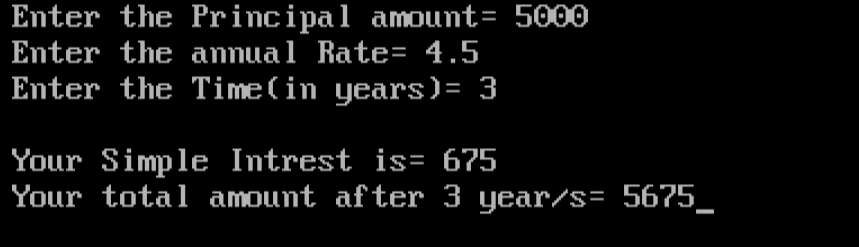
In the above program, the input of principal(P), rate(R), and time(T) are 5000, 4.5, and 3 respectively.
So,
SI5000*4.5*3 = 675
             100

A=P+SI=5000+675=5675

In this way, we obtain the simple interest and amount. Then it is displayed on the screen.


Checking whether a number is positive or negative in C++

Positive and negative numbers


Positive numbers are those numbers which have a plus sign(+) in front it. These numbers are greater(or bigger) than zero. A number written without any sign is also considered as a positive number. E.g: +7, 89, +22.145, 8.54 and so on.

Negative numbers are those numbers which have a minus sign(-) in front it. These numbers are smaller than zero. E.g: -1, -9.9, -3.145, -7.33333 and so on.
Zero(0) is neither a positive nor a negative number.

POSITIVE NUMBERS > 0 > NEGATIVE NUMBERS

Write a program in C++ to input a number from the user and check whether it is positive, negative or zero.


In this program, we input a number from the user. We compare it with zero(0). If the number is greater than 0, then we display it as a positive number. If it is smaller than 0, then we display it as a negative number. We check this conditions using if...else if...else statement and obtain our results. 


Program


#include<iostream.h>
#include<conio.h>
void main()
{
float a;
clrscr();
cout<<"Enter a number=";
cin>>a;
cout<<endl;
if(a>0)
           cout<<a<<" is a positive number"
else if(a<0)
           cout<<a<<" is a negative number";
else
           cout<<"You have entered zero";
getch();
}


Output


Program to check positive and negative numbers
CHECKING POSITIVE AND NEGATIVE NUMBERS


Explanation


In the above program, the user entered -7.33(i.e. a=-7.33). The value of a was compared with 0 and was found to be smaller than 0. The second condition in the if...else if...else statement was true. So, -7.33 is a negative number was displayed on the console screen.


Monday, 1 October 2018

Input and output of two-dimensional array in C++

Two-dimensional array


A two-dimensional array is an array having a pair of square brackets(or having two dimensions). It is an example of multidimensional array. It has a double size specification. A two-dimensional array is used for the implementation of a matrix. When a two-dimensional array is implemented as a matrix, the first dimension represents the number of rows and the second dimension represents the number of columns. E.g. a[2][2], a[3][2], a[4][4].

An array a[2][2] will have four elements which are a[0][0]a[0][1]a[1][0]a[1][1].


Write a program in C++ to input the values of a two-dimensional array and display it.


In this program, we declare an array. Then we input the number of rows and number of columns the user wants in that array. Then we use a nested for loop for the input of array. The outer for loop will be executed for the number of rows. The inner nested for loop will be executed for the number of columns. We input the values of all the elements of the array from the user and display it using another nested for loop.


Program


#include<iostream.h>
#include<conio.h>
void main()
{
int a[20][20],m,n,i,j;
clrscr();
cout<<"Input of two dimensional array"<<endl<<endl;
cout<<"Enter the number of rows=";
cin>>m;
cout<<"Enter the number of columns=";
cin>>n;
if(m>20||n>20)
      {
cout<<endl<<"Invalid input";
goto x;
}
cout<<endl;
for(i=0;i<m;i++)
          {
for(j=0;j<n;j++)
{
cout<<"Enter the element in a["<<i<<j<<"]= ";
cin>>a[i][j];
}
          }
cout<<endl<<"Output of two dimensional array"<<endl<<endl;
for(i=0;i<m;i++)
          {
for(j=0;j<n;j++)
{
cout<<a[i][j]<<"\t";
}
          cout<<endl;
          }
x:getch();
}


Output


Program to input the values of a two-dimensional array.
INPUT AND OUTPUT OF TWO-DIMENSIONAL ARRAY


Explanation


In the above, we have entered an array with two rows and two columns(i.e. m=2 and n=2). The nested for loop of the input of array is executed as follows:

i(<m)           j(<n)                 a[i][j]      
0                  0                      a[0][0]=6
                    1                      a[0][1]=9
1                  0                      a[1][0]=8
                    1                      a[1][1]=3.


In this way, we input the values for a two-dimensional array. A similar nested loop is executed for the display of two-dimensional array and we obtain our output on the screen.


Saturday, 29 September 2018

Printing the sum and average of n numbers in C++

Average of numbers

Average of numbers is the arithmetic mean of numbers. It is calculated when the sum of numbers is divided by the count of numbers being averaged.


Average of numbers
CALCULATION OF AVERAGE


Write a program in C++ to print the sum and average of n numbers without using an array.


In this program, we input the value of n and declare a for loop which iterates n number of time. We input the first numbers with the help of a variable and add it to a summation variable. Then we input the second number in the same variable that was used for the input of the first number and add it to the summation variable. In this way, all the numbers are added to the summation variable. The average is obtained by dividing the summation variable by n. The average must be assigned to float data type as it may have a decimal value.

The input value overwrites the previous value every time so it will not be stored in the program. If you want to store the input values then you must use an array for the input of numbers.


Program


#include<iostream.h>
#include<conio.h>
void main()
{
int m,n,i;
float sum=0,avg;
clrscr();
cout<<"How many numbers do you want to input=";
cin>>n;
cout<<endl;
for(i=1;i<=n;i++)
{
cout<<"Enter the number m"<<i<<"= ";
cin>>m;
sum=m+sum;
}
avg=(sum/n);
cout<<endl<<"Sum= "<<sum;
cout<<endl<<"Average= "<<avg;
getch();
}


Output


Program to find sum and average of numbers
SUM AND AVERAGE OF NUMBERS


Explanation

In this program, we used a variable m to store input number. The user wanted to input 5 (i.e. n=5) numbers so the for loop executed as follows:

i(<=5)          m          sum=sum+m       
1                   2           sum=0+2=2
2                   5           sum=2+5=7
3                   8           sum=7+8=15
4                   9           sum=15+9=24
5                   7           sum=24+7=31.

avg=(sum/n)=31/5=6.2

In the way, the value of sum and average was calculated and displayed on the screen.


Friday, 28 September 2018

Printing the sum and average of n numbers using an array in C++

Average of numbers

Average of numbers is the arithmetic mean of numbers. It is calculated when the sum of numbers is divided by the count of numbers being averaged.


Average of numbers
CALCULATION OF AVERAGE


Write a program in C++ to print the sum and average of n numbers using an array.


In this program, we input n numbers from the user with the help of array. We add each of the values to a variable and obtain the sum of n numbers. Then we divide the sum by n to obtain the average. The average must be assigned to float data type as it may have a decimal value.


Program

#include<iostream.h>
#include<conio.h>
void main()
{
int a[50],n,i;
float sum=0,avg;
clrscr();
cout<<"How many numbers do you want to input=";
cin>>n;
cout<<endl;
if (n>50)
{
cout<<"Invalid input";
goto x;
}
for(i=1;i<=n;i++)
{
cout<<"Enter the number in a["<<i<<"]= ";
cin>>a[i];
sum=a[i]+sum;
}
avg=(sum/n);
cout<<endl<<"Sum= "<<sum;
cout<<endl<<"Average= "<<avg;
x:getch();
}


Output


Sum and average calculation using an array
SUM AND AVERAGE CALCULATION


Explanation


In the above program, we have declared an array a. The program will display an invalid input message if the input is greater than 50. It is because the array size is declared 50 and can't store more 50 values. The inputs are stored as subscripts or elements of an array. Then all these values are added to the sum variable. Then the average is calculated and displayed on the screen.


Tuesday, 25 September 2018

Checking whether a number is Armstrong or not in C++

Armstrong numbers

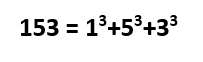
Armstrong numbers are those multi-digit numbers in which the sum of cube of each digit of the number is equal to the number itselfThe four Armstrong number are 153, 370, 371, 407. Observe the example below:

Checking Armstrong number in C++


Write a program in C++ to input a multi-digit number from the user and check whether it is Armstrong or not.

We will input a multi-digit number from the user. Then we will extract the last digit of the number one by one using mod(%) operator. We will calculate its cube and add it to a new variable. Then using slash(/) operator we will remove the last digit. Then a new digit is extracted again and this process continues till the input number is reduced to zero. Also, see the program to calculate the sum of digits of a multi-digit number for a proper understanding of this program.


Program


#include<iostream.h>
#include<conio.h>
void main()
{
int a,b,sum=0,c;
clrscr();
cout<<"Enter a multi digit number=";
cin>>a;
c=a;
while (a!=0)
{
b=a%10;
sum=sum+(b*b*b);
a=a/10;
}
if(sum==c)
cout<<"\nThe number is Armstrong";
else
cout<<"\nThe number is not Armstrong";
getch();
}


Output


Program to check Armstrong number in C++.
CHECKING OF AN ARMSTRONG NUMBER


Explanation


In the program, the input 153 was stored in variable a and c. The value of a was processed in a loop whereas the value of c was left for comparison after the loop. The while loop was executed as follows:

a                       b=a%10                    sum=sum+(b*b*b)                a=a/10
153                   b=153%10=3            sum=0+(3*3*3)=27                a=153/10=15
15                     b=15%10=5              sum=27+(5*5*5)=152            a=15/10=1
1                       b=1%10=               sum=152+(1*1*1)=153          a=1/10=0
0

Since the value of a is zero(i.e. a=0) the while loop terminates. Now the if statement compares the value of sum and c. If they are equal then the number is Armstrong. In above program 153 is an Armstrong number, so the respective message was displayed on the screen.


Sunday, 23 September 2018

Checking whether a number is a palindrome or not in C++

Palindrome number

Palindrome numbers are those numbers which remain the same even after reversing.12321 is a palindrome number as the number remains the same even after reversing i.e.12321. This program uses the same idea used in finding the reverse of a number


Write a program in C++ to input a multi-digit number and check whether it is a palindrome or not.


We need to input a multi-digit number from the user and copy it to another variable. Then we extract the last digit of the multi-digit number by performing the mod operation with 10. The extracted value is added to a new variable which is multiplied by 10 every time. This increases one decimal place of each digit of the number in a new variable before adding the last digit to it. The last digit is then removed by using slash(/) operator and storing it in int data type. This process is continued until the multi-digit number is reduced to zero(0). Finally, after the while loop is terminated, we compare the reverse with the value copied initially. If the two value matches the number is a palindrome else it is not.


Program


#include<iostream.h>
#include<conio.h>
void main()
{
int a,b=0,rev=0,check;
clrscr();
cout<<"Enter a multidigit number=";
cin>>a;
check=a;
while(a!=0)
{
b=a%10;
rev=(rev*10)+b;
a=a/10;
}
if(check==rev)
cout<<"\nThe number is palindrome";
else
cout<<"\nThe number is not palindrome";
getch();
}


Output


Program to check palindrome numbers.
CHECKING OF PALINDROME NUMBER


Explanation


In the program, we entered a=565 which first is assigned to variable check. Since the value of a is not equal to zero(565!=0 is true), while loop will be executed as follows:

a                 b=a%10                  rev=(rev*10)+b                      a=a/10        
565             565%10=5              (0*10)+5=5                            565/10=56
56               56%10=6                (5*10)+6=56                          56/10=5
5                 5%10=5                  (56*10)+5=565                      5/10=0
0

The while loop will terminate since a=0. Now the if...else statement will check whether the value rev(reverse of a number) is equal to the value of check(input number). If they are equal then the number is palindrome message will be displayed on the screen.