Showing posts with label Array. Show all posts

Thursday, 4 October 2018

Finding out the minimum number among an array of n numbers in C++

Static and dynamic data structure


A data structure whose size cannot be changed at the run-time is called static data structure. The size of a static data structure can neither be increased nor decreased at run-time. It may lead to the wastage or shortage of memory locations.

An array is an example of a static data structure. Once the size of an array is declared it can't be changed. If we declare an array of size 5 then we can't increase or decrease its size during run-time. If we utilize only 2 locations then the remaining memory is wasted. This problem is addressed by the introduction of the dynamic data structure.

A data structure whose size can be changed at the run-time is called dynamic data structure. The size of a dynamic data structure can either be increased or decreased at run-time. It prevents the wastage or shortage of memory locations.


Write a program in C++ to input an array of numbers and find the minimum number among it.


In the program, we input n numbers from the user and store it in the form of an array. Then we assign the value of the first element of an array to an extra variable. The extra variable is compared with all elements of the array starting from the second element. If any number in the array is smaller than the extra variable then the smaller value is assigned to the extra variable. This process is executed for all values of the array and we get the minimum number.


Program


#include<iostream.h>
#include<conio.h>
void main()
{
int m[20],a,min,i;
clrscr();
cout<<"How many numbers do you want to enter=";
cin>>a;
cout<<endl;
if(a>20)
{
cout<<"Invalid size";
goto x;
}
for(i=1;i<=a;i++)
{
cout<<"Enter number m["<<i<<"]= ";
cin>>m[i];
}
min=m[1];
cout<<endl;
for(i=2;i<=a;i++)
{
if(min>m[i])
min=m[i];
}
cout<<"The minimum number= "<<min;
x:getch();
}


Output


Program to print the minimum number
FINDING THE MINIMUM NUMBER


Explanation 


In the above program, we have entered 5(i.e. a=5) numbers. The first value of array (a[1]) is assigned to min(i.e. min=a[1]=103). The comparison process within the for loop is executed as follows:

i(<=5)          min          m[i]                  m[i]<min          Action              
2                 103           m[2]=56           True                  min=a[2]=56
3                 56             m[3]=44           True                  min=a[3]=44
4                 44             m[4]=87           False         
5                 44             m[5]=95           False 


In this way, the minimum value is stored in the min variable and displayed on the screen.


Monday, 1 October 2018

Input and output of two-dimensional array in C++

Two-dimensional array


A two-dimensional array is an array having a pair of square brackets(or having two dimensions). It is an example of multidimensional array. It has a double size specification. A two-dimensional array is used for the implementation of a matrix. When a two-dimensional array is implemented as a matrix, the first dimension represents the number of rows and the second dimension represents the number of columns. E.g. a[2][2], a[3][2], a[4][4].

An array a[2][2] will have four elements which are a[0][0]a[0][1]a[1][0]a[1][1].


Write a program in C++ to input the values of a two-dimensional array and display it.


In this program, we declare an array. Then we input the number of rows and number of columns the user wants in that array. Then we use a nested for loop for the input of array. The outer for loop will be executed for the number of rows. The inner nested for loop will be executed for the number of columns. We input the values of all the elements of the array from the user and display it using another nested for loop.


Program


#include<iostream.h>
#include<conio.h>
void main()
{
int a[20][20],m,n,i,j;
clrscr();
cout<<"Input of two dimensional array"<<endl<<endl;
cout<<"Enter the number of rows=";
cin>>m;
cout<<"Enter the number of columns=";
cin>>n;
if(m>20||n>20)
      {
cout<<endl<<"Invalid input";
goto x;
}
cout<<endl;
for(i=0;i<m;i++)
          {
for(j=0;j<n;j++)
{
cout<<"Enter the element in a["<<i<<j<<"]= ";
cin>>a[i][j];
}
          }
cout<<endl<<"Output of two dimensional array"<<endl<<endl;
for(i=0;i<m;i++)
          {
for(j=0;j<n;j++)
{
cout<<a[i][j]<<"\t";
}
          cout<<endl;
          }
x:getch();
}


Output


Program to input the values of a two-dimensional array.
INPUT AND OUTPUT OF TWO-DIMENSIONAL ARRAY


Explanation


In the above, we have entered an array with two rows and two columns(i.e. m=2 and n=2). The nested for loop of the input of array is executed as follows:

i(<m)           j(<n)                 a[i][j]      
0                  0                      a[0][0]=6
                    1                      a[0][1]=9
1                  0                      a[1][0]=8
                    1                      a[1][1]=3.


In this way, we input the values for a two-dimensional array. A similar nested loop is executed for the display of two-dimensional array and we obtain our output on the screen.


Saturday, 29 September 2018

Finding out the maximum number among an array of n numbers in C++

Static and dynamic data structure


A data structure whose size cannot be changed at the run-time is called static data structure. The size of a static data structure can neither be increased nor decreased at run-time. It may lead to the wastage or shortage of memory locations.

An array is an example of a static data structure. Once the size of an array is declared it can't be changed. If we declare an array of size 5 then we can't increase or decrease its size during run-time. If we utilize only 2 locations then the remaining memory is wasted. This problem is addressed by the introduction of the dynamic data structure.

A data structure whose size can be changed at the run-time is called dynamic data structure. The size of a dynamic data structure can either be increased or decreased at run-time. It prevents the wastage or shortage of memory locations.


Write a program in C++ to input an array of numbers and find the maximum number among it.


In the program, we input n number from the user and store it in the form of an array. Then we assign an extra variable with value 0. The extra variable is compared with all elements of the array. If any number in the array is greater than the extra variable then the greater value is assigned to the extra variable. This process is executed for all values of the array and we get the maximum number.  


Program


#include<iostream.h>
#include<conio.h>
void main()
{
int a[50],n,i,max=0;
clrscr();
cout<<"How many numbers do you want to input=";
cin>>n;
cout<<endl;
if (n>50)
{
cout<<"Invalid input";
goto x;
}
for(i=1;i<=n;i++)
{
cout<<"Enter the number in a["<<i<<"]= ";
cin>>a[i];
if (a[i]>max)
max=a[i];
}
cout<<endl<<"The maximum number= "<<max;
x:getch();
}


Output


Searching maximum number in an array
FINDING THE MAXIMUM NUMBER


Explanation  

In the above program, we have entered 5(i.e. n=5) numbers. The for loop is executed as follows:

i(<=5)         max          a[i]                a[i]>max          Action              
1                 0               a[1]=67          True                 max=a[1]=67
2                 67             a[2]=88          True                 max=a[2]=88
3                 88             a[3]=110        True                 max=a[3]=110
4                 110           a[4]=98          False           
5                 110           a[5]=52          False   


In this way, the maximum value is stored in max variable and displayed on the screen. 


Friday, 28 September 2018

Printing the sum and average of n numbers using an array in C++

Average of numbers

Average of numbers is the arithmetic mean of numbers. It is calculated when the sum of numbers is divided by the count of numbers being averaged.


Average of numbers
CALCULATION OF AVERAGE


Write a program in C++ to print the sum and average of n numbers using an array.


In this program, we input n numbers from the user with the help of array. We add each of the values to a variable and obtain the sum of n numbers. Then we divide the sum by n to obtain the average. The average must be assigned to float data type as it may have a decimal value.


Program

#include<iostream.h>
#include<conio.h>
void main()
{
int a[50],n,i;
float sum=0,avg;
clrscr();
cout<<"How many numbers do you want to input=";
cin>>n;
cout<<endl;
if (n>50)
{
cout<<"Invalid input";
goto x;
}
for(i=1;i<=n;i++)
{
cout<<"Enter the number in a["<<i<<"]= ";
cin>>a[i];
sum=a[i]+sum;
}
avg=(sum/n);
cout<<endl<<"Sum= "<<sum;
cout<<endl<<"Average= "<<avg;
x:getch();
}


Output


Sum and average calculation using an array
SUM AND AVERAGE CALCULATION


Explanation


In the above program, we have declared an array a. The program will display an invalid input message if the input is greater than 50. It is because the array size is declared 50 and can't store more 50 values. The inputs are stored as subscripts or elements of an array. Then all these values are added to the sum variable. Then the average is calculated and displayed on the screen.


Wednesday, 26 September 2018

Multiplication of two matrices of order m*n and p*q in C++

Multiplication of matrices


The multiplication of two matrices is possible only if the number of columns in the first matrix is equal to the number of rows in the second matrix. The resulting matrix (i.e. product) will have the number of rows equal to the number of rows in the first matrix and no of columns equal to the number of column in the second matrix.

The multiplication of two matrices of order m*n and p*q is possible only if n=p and the order of resultant matrix will be m*q.

Multiplication is obtained as follows:

The product of two matrices of variable size
 MATRIX MULTIPLICATION


The ijth element of the product matrix is obtained by the summation of the product of the corresponding terms of the ith row of the first matrix and jth column of the second matrix.


Write a program in C++ to find the product of two matrices of order m*n and p*q.


In the program, we input two matrices using nested for loop in the form of a two-dimensional array. We need to check the condition required for the multiplication of two matrices. We also need to confirm that the user has entered the rows and columns of matrix smaller than the size of the array. If both conditions satisfy then the multiplication is performed and we get the result.

Program


#include<iostream.h>
#include<conio.h>
void main()
{
int a[20][20],b[20][20],c[20][20],m,n,p,q,i,j,k;
clrscr();
cout<<"Enter the number of rows in first matrix=";
cin>>m;
cout<<"Enter the number of column in first matrix=";
cin>>n;
cout<<"Enter the number of rows in second matrix=";
cin>>p;
cout<<"Enter the number of column in second matrix=";
cin>>q;
if ((n!=p)||(m>20)||(n>20)||(p>20)||(q>20))
  {
cout<<"\nInvalid input";
goto x;
}
cout<<"Input of first matrix\n";
        for(i=0;i<m;i++)
{
for(j=0;j<n;j++)
{
cout<<"Enter the element of["<<i<<"]["<<j<<"]= ";
cin>>a[i][j];
}
}
cout<<"Input of second matrix\n";
        for(i=0;i<p;i++)
{
for(j=0;j<q;j++)
{
cout<<"Enter the element of["<<i<<"]["<<j<<"]= ";
cin>>b[i][j];
}
}
for(i=0;i<m;i++)                                                                                   //Multiplication of matrix
{
for(j=0;j<q;j++)
{
c[i][j]=0;
for(k=0;k<n;k++)
{
c[i][j]=c[i][j]+a[i][k]*b[k][j];
}
}
}
cout<<"\nYour output matrix\n\n";
         for(i=0;i<m;i++)
{
for(j=0;j<q;j++)
{
cout<<c[i][j]<<"\t";
}
cout<<endl;
}
x:getch();
}


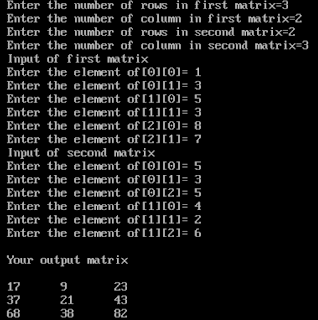
Output


Program to calculate product of matrix
MATRIX MULTIPLICATION


Explanation


In the program we are performing multiplication of two matrix of order 3*2 and 2*3. The input of is taken as shown above. The multiplication is calculated as shown below:

i<3          j<3          k<2          c[i][j]          c[i][j]=c[i][j]+a[i][k]*b[k][j]
0             0              0               0               c[0][0]=c[0][0]+a[0][0]*b[0][0]=0+1*5=5
                               1               5               c[0][0]=c[0][0]+a[0][1]*b[1][0]=5+3*4=17      
               1              0               0               c[0][1]=c[0][1]+a[0][0]*b[0][1]=0+1*3=3 
                               1               3               c[0][1]=c[0][1]+a[0][1]*b[1][1]=3+3*2=9  
               2              0               0               c[0][2]=c[0][2]+a[0][0]*b[0][2]=0+1*5=5 
                               1               5               c[0][2]=c[0][2]+a[0][1]*b[1][2]=5+3*6=23.


The process continues till i=2 and calculates all elements of product matrix of order 3*3. We obtain the result and it is printed on the screen. 


Addition of two matrices of order m * n in C++

Addition of matrices

The addition of two matrices of the same order is obtained by the addition of corresponding elements. Only the matrices of the same order can be added and the sum also has the same order (as that of the matrices which are added). Example:


Sum of two matrices
MATRIX ADDITION


Write a program in C++ to input two matrices of order m*n and display its sum.

In this program, we input two matrices by using nested for loop and store the matrices with the help of two-dimensional array. Then we perform the addition of their corresponding elements. Finally, we display the sum of two matrices using another nested for loop.

A two-dimensional array is those array which contains a pair of the square bracket. A two dimensional is declared as:
datatype a[m][n];
Where m is the number of rows and n is the number of columns.

The array a[2][2] contains four elements which are: a[0][0] , a[0][1], a[1][0], a[1][1].


Program

#include<iostream.h>
#include<conio.h>
void main()
{
int a[20][20],b[20][20],c[20][20],i,j,m,n;
clrscr();
cout<<"Enter the number of rows of the matrix=";
cin>>m;
cout<<"\nEnter the number of colomns of the matrix=";
cin>>n;
if(m>20||n>20)
{
cout<<"\nInvalid size of the matrix";
goto x;
}
cout<<"\nEnter values for first matrix:\n";                             

for (i=0;i<m;i++)                                                                    //Input of first matrix    
{
for(j=0;j<n;j++)
{
cout<<"Enter the element a["<<i<<"]["<<j<<"]= ";
cin>>a[i][j];
}
  }
cout<<"\nEnter values for second matrix:\n";                         

for (i=0;i<m;i++)                                                                    //Input of second matrix
{
for(j=0;j<n;j++)
{
cout<<"Enter the element b["<<i<<"]["<<j<<"]= ";
cin>>b[i][j];
}
}

for (i=0;i<m;i++)                                                                    //Summation of two matrices
{
for(j=0;j<n;j++)
{
c[i][j]=a[i][j]+b[i][j];
}
}

cout<<"\nYour result is:\n";                                               
for (i=0;i<m;i++)                                                                   
//Printing of sum
{
for(j=0;j<n;j++)
{
cout<<c[i][j]<<"\t";
}
cout<<endl;
}
x:getch();
}


Output

Program to add two matrices
MATRIX ADDITION


Explanation

In the program, we performed the addition of two matrices of order 2*2. The input is done using
nested for loop as it assign the value of the elements (a[0][0], a[0][1], a[1][0], a[1][1] ) individually.The addition is performed as follows:

i(<2)          j(<2)                      c[i][j]=a[i][j]+b[i][j]
                0                          c[0][0]=a[0][0]+b[0][0]=4+4=8     
                    1                          c[0][1]=a[0][1]+b[0][1]=3+3=6
                0                          c[1][0]=a[1][0]+b[1][0]=2+5=7
                    1                          c[1][1]=a[1][1]+b[1][1]=6+9=15.

In this way, we obtain the addition of two matrices and it is displayed using nested for loop.


Saturday, 22 September 2018

Printing of Pascal's triangle in C++


Pascal's triangle 

Pascal's triangle is a mathematical triangle named after French mathematician Blaise Pascal. This triangle consists of different numbers and has infinite numbers of rows. The main arithmetic followed to create this triangle is the addition. The number of elements in a row is equal to the row on which the elements are placed on. The following triangle is the example of Pascal's triangle having five rows:


                       1
                    1    1
                 1      1
              1    3    3    1
           1    4    6    4    1


The first row in triangle contains only one number i.e 1. In the second row, the first element 1 is the sum of its top left and right element i.e 0 and 1. Similarly, the second element 1 of the second row is the sum of its top left and right element i.e 1 and 0. In the third row first element is 1 which is the sum of its top left and right numbers i.e 0 and 1. The second element on the third row is 2 which is the sum of its top left and right number i.e 1 and 1. A similar process is carried out to find elements in other rows of the triangle.


Write a program in C++ to print Pascal's triangle with n number of rows.


We will ask the user about the number of row s/he wants to print.We will use a matrix to create the triangle.The first and last element of each row is declared as 1.The the elements a[i][j] in between are calculated by the sum of top left a[i-1][j-1] and top right element a[i-1][j] as:

a[i][j]=a[i-1][j-1]+a[i-1][j];

Then we print the matrix.


Program

#include<iostream.h>
#include<conio.h>
void main()
{
int i,j,k,n,x,y,z;
int a[20][20];
clrscr();
cout<<"Enter a number of rows= ";
cin>>n;
for(k=1;k<=n;k++)                                     //Loop for declaration of first and last element of row as 1
{                                                               
a[k][1]=1;                                                               
a[k][k]=1;                                                                         
}                                                                                       
for(i=3;i<=n;i++)                                      /
/Loop for calculation of middle elements of row    
{
for(j=2;j<i;j++)
{
a[i][j]=a[i-1][j-1]+a[i-1][j];
}
}
for(x=1;x<=n;x++)                                   //Loop for printing of matrix       
{                                                                               
for(z=n;z>x;z--)                                //Loop for manipulation of spaces                             
{
cout<<"  ";
}
for(y=1;y<=x;y++)
{
cout<<"  "<<a[x][y];
}
cout<<"\n";
}
getch();
}


Output

Program to print Pascal's triangle
PRINTING OF PASCAL'S TRIANGLE


Explanation

In the above program, the user wanted to print Pascal's triangle with 5 number of rows. The numbers were stored in an array and addition was performed as per the method discussed above. Pascal's triangle with 5 rows was displayed on the output screen.


Fact about C++

The output screen(i.e black in color) in C++ programming is also called Console screen.


Friday, 21 September 2018

Input and output of one-dimensional array

Initialization of one-dimensional array by the user


In this process, we assign different values to the element of an array as per the choice of the user. Each element is assigned a value entered by the user. It is stored collectively in individual memory spaces. It is then displayed on the output screen by printing the elements individually.


Write a program in C++ to initialize an array from the user and print it.


We have to consider an array. Values must be entered individually using for loop statement and printed using another for loop.   


Program


#include<iostream.h>
#include<conio.h>
void main()
{
int a[5],i;
clrscr();
cout<<"\nInput of array\n\n";
for(i=0;i<5;i++)
{
cout<<"Enter the value in a["<<i<<"]= ";
cin>>a[i];
}
cout<<"\nDisplaying of array\n";
for(i=0;i<5;i++)
{
cout<<"\nThe value in a["<<i<<"]= "<<a[i];
}
getch();
}


Output


Manipulation of a one-dimensional array
INITIALIZATION OF ONE-DIMENSIONAL ARRAY


Explanation


We have assigned a value to each and every element one by one as per the input of the user. We used a for loop for obtaining the elements of the array individually and also for displaying them. In the above program, we used a for loop for a[i] during input and display of array.


Also, see Introduction to matrix and types of array 


Initialization of array and its types with examples

Initialization of array and its types


The process of assigning the values to elements of an array is called an initialization of the array. It can be done by a various method which is explained briefly below with examples.

Element by element

In this case, each and every element of an array is assigned with a value individually.

E.g.  int a[3];
         a[0]=45;
         a[1]=7;
         a[2]=-4;

Declaration and initialization at the same time


The values are assigned to the array at the time of declaration. The values are assigned collectively within a single statement. The values are assigned by keeping them within curly braces{ } and are separated by commas (,).

E.g.

  • int a[3]={45,7,-4};

          which gives: 

          a[0]=45          a[1]=7        a[2]=-4


  • int a[3]={5};     

          which gives a[0]=5 and all the other elements will return a garbage value.

 
Initialization from the user


In this process, we assign different values to the element as per the choice of the user. A for loop is applied to individually call the elements of the array. The values are assigned as per the user and stored in respective subscripts. Then again a for loop is used and elements are displayed individually on the output screen.

Also, see Input and output of a one-dimensional array


Introduction to matrix and types of array

Matrix and array


Matrix

Matrix is a rectangular array of numbers arranged in rows (horizontal lines) and columns (vertical lines) enclosed between a pair of round or square brackets. E.g.


Example of matrices
EXAMPLES OF MATRIX


Order of matrix

Order or size of a matrix is given by the number of rows followed by the number of columns. In the example the first matrix has one row and two columns, so the order is 1*2 (read as 1 by 2). Similarly, the order of other matrices is 2*2, 3*3, 3*1.


Array

An array is a homogeneous (same type) collection of elements or data having a common property and sharing a common name. It can be declared normally like ordinary variables using [ ] for size specification.

For e.g. int a[5] is used to store 5 integer values in a[0],a[1],a[2],a[3],a[4].

a[0] is first element of array a. a[0],a[1],a[2],a[3],a[4] are called elements or subscripts.

All 5 variables are stored in different memory locations.


Types of array 


Single dimensional array
                                           The array having only a single pair of brackets with array name is called single dimensional array. They have single size specification.E.g. a[5].


Multidimensional array
                                         The array having more than one pair of brackets with the array name is called a multidimensional array. They have multiple size specification.
E.g. ex[5][5]g[2][4][2].

           
two-dimensional array is an array having a pair of square brackets(or having two dimensions). It is an example of multidimensional array. It has a double size specification. A two-dimensional array is used for the implementation of a matrix. When a two-dimensional array is implemented as a matrix, the first dimension represents the number of rows and the second dimension represents the number of columns. E.g. a[2][2]a[3][2]a[4][4].

An array a[2][2] will have four elements which are a[0][0]a[0][1]a[1][0]a[1][1].