Showing posts with label Series. Show all posts

Tuesday, 2 October 2018

Printing counting numbers till n using if and goto statement in C++

Counting numbers


The infinite set of natural numbers or positive integers are known as counting numbers. They are used for quantification process(i.e. finding the quantity). All the integers from 1 to infinity are considered as counting numbers i.e. 1, 2, 3, 4, 5,.......to infinity.


Write a program in C++ to print counting numbers till n using if and goto statement.


In this program, we input how many numbers the user wants to print. Then using if and goto statement, we print the counting numbers. Generally for, while, or do...while statement is used for executing the same statement repeatedly. But the if statement can also be used to execute the same statement repeatedly using a goto statement. This method of using if and goto statement to produce iteration is not recommended as it increases the execution time of a program.

The goto statement is used to transfer the control of execution of the program to a specified label. It alters the normal sequence of program execution.
Syntax:
             goto label name;

The label is an identifier of the target where the control of execution is to be shifted. It can be placed anywhere within the main function, below or above the goto statement.


Program


#include<iostream.h>
#include<conio.h>
void main()
{
int n,i=1;
clrscr();
cout<<"How many numbers do you print= ";
cin>>n;
x:if(i<=n)
{
cout<<i<<endl;
i++;
goto x;
}
getch();
}


Output


Program to print counting numbers
PRINTING COUNTING NUMBERS USING IF AND GOTO STATEMENT


Explanation


In this program, the user wants to print 10 numbers(i.e. n=10). We use if statement to check whether the condition i<=n(i.e. 1<=10) is true or false. If the condition is true then the number is printed. Every time a number has printed the control of execution is brought back to the condition of if statement by the goto statement. This process is continued till i<=n is true. In this way, an iteration is produced and we obtain our required output on the screen. 


Tuesday, 25 September 2018

Printing n prime numbers in C++

Prime numbers

Prime numbers are those numbers which are divisible by and itself only. A prime number doesn't have any pattern but can be determined by the division process.
      E.g. 2,3,5,7,...etc. (i.e. 7 is divisible by 1 and itself only, so it is a prime number.)
Zero and one (0,1) are neither prime nor composite numbers

Write a program in C++ to input a number from the user and print all the prime numbers up to it.

We need to input a number from the user and print the prime numbers up to that number. We will use a nested for loop to print the numbers. For loop is considered in such a way that each number is divided by all positive integer greater than 1 and less than the number(1<Divisor<Number). If any particular number is not divisible by any divisor, then it is considered a prime number and is printed.

The break statement is jump control statement which transfers the control out of the loop (i.e. the loop terminates). The break statement only terminates the loop which contains the statement.
Syntax:
                  break;

Program


#include<iostream.h>
#include<conio.h>
void main()
{
int a,b,c=0,n;
clrscr();
cout<<"Enter the number upto which you want to print the prime number=";
cin>>n;
for(a=1;a<=n;a++)
          {  
                  for(b=2;b<a;b++)
                 {
                 if(a%b==0)
                 break;
                 }
          if (b==a)
          cout<<a<<endl;
          }
getch();
}

Output

Program to print prime numbers
PRINTING N PRIME NUMBERS


Explanation

In the above program, our input is 19(i.e. n=19). So the nested for loop will be executed as follows:

a        a<=19               b           b<a                      a%b                       b==a                  Action
1        True                  2           2<1 is false                                          1=2 is false
2        True                  2           2<2 is false                                          2=2 is true          2 is printed.
3        True                  2           2<3 is true           3%2=0 is false          
                                   3           3<3 is false                                          3=3 is true           3 is printed.
4        True                  2           2<4 is true           4%2=0 is true                                      Break.
5        True                  2           2<5 is true           5%2=0 is false                  
          True                  3           3<5 is true           5%3=0 is false   
          True                  4           4<5 is true           5%4=0 is false   
          True                  5           5<5 is false                                          5=5 is true          5 is printed.  

The process is continued till a=19. The required prime number get printed on the screen.                                


Printing n prime numbers using a user-defined function in C++

Prime numbers

Prime numbers are those numbers which are divisible by and itself only. A prime number doesn't have any pattern but can be determined by the division process.
      E.g. 2,3,5,7,...etc. (i.e. 7 is divisible by 1 and itself only, so it is a prime number.)
Zero and one (0,1) are neither prime nor composite numbers


Write a program in C++ to input a number from the user and print all the prime numbers up to the number using a user-defined function.

We have to input a number till which the user wants to print the prime numbers. In this program user- defined function is used to print the numbers. A user-defined function is a function created by the user to perform a specific task. It contains three essential statements which are as follows:
  1. Function declaration or prototype 
  2. Function call statement
  3. Function definition
In the program, all the number will be passed to the function definition. The function will return 1 for prime numbers and 0 for composite. If 1 is returned to the function call then the number will be printed on the screen else it is not printed. 


Program


#include<iostream.h>
#include<conio.h>
int prime(int);                                                           //Function declaration or prototype
void main()
{
int i,n,r;
clrscr();
cout<<"Enter the number upto which you want to print the prime numbers=";
cin>>n;
cout<<"\n";
for (i=0;i<=n;i++)                                         
{                                                                                     
r=prime (i);                                                          //Function call statement
if (r==1)
cout<<i<<endl;
}
getch();
}
int prime(int a)                                                         //Function definition
    {
    int c;
    for(c=2;c<=a-1;c++)
         {
         if (a%c==0)
         return 0;
         }
if (a==c)
return 1;
}


Output

Program to print n prime numbers
PRINTING N PRIME NUMBERS 


Explanation

We have entered the value 19 in the program. Now all the values from 1 to 19 are passed to the function definition. The operations in the loop will be performed as follows:

a=i        c         c<=a-1                        a%c==0                a==c                        Return value
0           2         2<=-1 is false                                                                            NULL
1           2         2<=0 is false                                                                             NULL
2           2         2<=1 is false                                             2=2 is true               1
3           2         2<=2 is true              3%2=0 is false
             3         3<=2 is false                                             3=3 is true               1
4           2         2<=3 is true              4%2=0 is true                                          0
5           2         2<=4 is true              5%2=0 is false       
             3         3<=4 is true              5%3=0 is false
             4         4<=4 is true              5%4=0 is false
             5         5<=4 is false                                             5=5 is true               1


The process will continue till a=19. Those numbers with return value 1 will be printed and we obtain our required output.


Checking whether a number is Armstrong or not in C++

Armstrong numbers

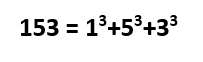
Armstrong numbers are those multi-digit numbers in which the sum of cube of each digit of the number is equal to the number itselfThe four Armstrong number are 153, 370, 371, 407. Observe the example below:

Checking Armstrong number in C++


Write a program in C++ to input a multi-digit number from the user and check whether it is Armstrong or not.

We will input a multi-digit number from the user. Then we will extract the last digit of the number one by one using mod(%) operator. We will calculate its cube and add it to a new variable. Then using slash(/) operator we will remove the last digit. Then a new digit is extracted again and this process continues till the input number is reduced to zero. Also, see the program to calculate the sum of digits of a multi-digit number for a proper understanding of this program.


Program


#include<iostream.h>
#include<conio.h>
void main()
{
int a,b,sum=0,c;
clrscr();
cout<<"Enter a multi digit number=";
cin>>a;
c=a;
while (a!=0)
{
b=a%10;
sum=sum+(b*b*b);
a=a/10;
}
if(sum==c)
cout<<"\nThe number is Armstrong";
else
cout<<"\nThe number is not Armstrong";
getch();
}


Output


Program to check Armstrong number in C++.
CHECKING OF AN ARMSTRONG NUMBER


Explanation


In the program, the input 153 was stored in variable a and c. The value of a was processed in a loop whereas the value of c was left for comparison after the loop. The while loop was executed as follows:

a                       b=a%10                    sum=sum+(b*b*b)                a=a/10
153                   b=153%10=3            sum=0+(3*3*3)=27                a=153/10=15
15                     b=15%10=5              sum=27+(5*5*5)=152            a=15/10=1
1                       b=1%10=               sum=152+(1*1*1)=153          a=1/10=0
0

Since the value of a is zero(i.e. a=0) the while loop terminates. Now the if statement compares the value of sum and c. If they are equal then the number is Armstrong. In above program 153 is an Armstrong number, so the respective message was displayed on the screen.


Monday, 24 September 2018

Printing Fibonacci series with n terms in C++

Fibonacci series

Fibonacci series is an infinite sequence of positive integers in which any number is the sum of two preceding (previous) numbers, except for the first two numbers. The series is as follows:

0, 1, 1, 2, 3, 5, 8, 13, 21, 34, 55, 89, 144, ......so on.


We can observe that each number except the first two (i.e. 0 and 1) is the sum of the previous two numbers.

Mathematically,

Printing Fibonacci series with n terms
FORMULATION OF FIBONACCI SERIES


Write a program in C++ to print Fibonacci series with n number of terms.


As the first two numbers do not satisfy the generalization, so we have to print them separately. They will not be included in the formulation. The other numbers will be printed by the formulation. The first two numbers will be initialized and printed directly as:
First number = 0
Second number = 1
Print the first number.
Print the second number.

Inside the loop, the following operation will occur:
                         Third number = First number + Second number
                         Print the third number.
                         First number = Second number
                         Second number = Third number
The for loop will run as long as the condition is true to give the required output. 


Program

#include<iostream.h>
#include<conio.h>
void main()
{
int a=0,b=1,c,sum,i;
clrscr();
cout<<"Enter the numbers of terms you want to print=";
cin>>c;
c=c-2;
cout<<"Your fibonacci series is\n";
cout<<a<<"\n";
cout<<b<<"\n";
for(i=0;i<c;i++)
{
sum=a+b;
cout<<sum<<"\n";
a=b;
b=sum;
}
getch();
}


Output


Program to print Fibonacci series
PRINTING OF FIBONACCI SERIES WITH N TERMS


Explanation


In the program, the user wants to print 10 (value of c) terms. The first two terms (i.e. 0 and 1) are already printed, so the loop is executed (value of c-2) times. The for loop is executed as follows:

i            a            b          sum=a+b                  Output screen              a=b             b=sum
0           0             1          sum=0+1=1                 1                                     a=1              b=1
1           1             1          sum=1+1=2                 2                                     a=1              b=2
2           1             2          sum=1+2=3                 3                                     a=2              b=3
3           2             3          sum=2+3=5                 5                                     a=3              b=5
4           3             5          sum=3+5=8                 8                                     a=5              b=8
5           5             8          sum=5+8=13               13                                   a=8              b=13
6           8             13        sum=8+13=21             21                                   a=13            b=21
7           13           21        sum=13+21=34           34                                   a=21            b=34
8 (which is not less than 8, so the execution stops.)

In this way, 0 and 1 (first two terms) are printed directly and the remaining is printed by for loop as shown in the table.