Showing posts with label Control statement. Show all posts

Tuesday, 2 October 2018

Printing counting numbers till n using if and goto statement in C++

Counting numbers


The infinite set of natural numbers or positive integers are known as counting numbers. They are used for quantification process(i.e. finding the quantity). All the integers from 1 to infinity are considered as counting numbers i.e. 1, 2, 3, 4, 5,.......to infinity.


Write a program in C++ to print counting numbers till n using if and goto statement.


In this program, we input how many numbers the user wants to print. Then using if and goto statement, we print the counting numbers. Generally for, while, or do...while statement is used for executing the same statement repeatedly. But the if statement can also be used to execute the same statement repeatedly using a goto statement. This method of using if and goto statement to produce iteration is not recommended as it increases the execution time of a program.

The goto statement is used to transfer the control of execution of the program to a specified label. It alters the normal sequence of program execution.
Syntax:
             goto label name;

The label is an identifier of the target where the control of execution is to be shifted. It can be placed anywhere within the main function, below or above the goto statement.


Program


#include<iostream.h>
#include<conio.h>
void main()
{
int n,i=1;
clrscr();
cout<<"How many numbers do you print= ";
cin>>n;
x:if(i<=n)
{
cout<<i<<endl;
i++;
goto x;
}
getch();
}


Output


Program to print counting numbers
PRINTING COUNTING NUMBERS USING IF AND GOTO STATEMENT


Explanation


In this program, the user wants to print 10 numbers(i.e. n=10). We use if statement to check whether the condition i<=n(i.e. 1<=10) is true or false. If the condition is true then the number is printed. Every time a number has printed the control of execution is brought back to the condition of if statement by the goto statement. This process is continued till i<=n is true. In this way, an iteration is produced and we obtain our required output on the screen. 


Checking whether a number is positive or negative in C++

Positive and negative numbers


Positive numbers are those numbers which have a plus sign(+) in front it. These numbers are greater(or bigger) than zero. A number written without any sign is also considered as a positive number. E.g: +7, 89, +22.145, 8.54 and so on.

Negative numbers are those numbers which have a minus sign(-) in front it. These numbers are smaller than zero. E.g: -1, -9.9, -3.145, -7.33333 and so on.
Zero(0) is neither a positive nor a negative number.

POSITIVE NUMBERS > 0 > NEGATIVE NUMBERS

Write a program in C++ to input a number from the user and check whether it is positive, negative or zero.


In this program, we input a number from the user. We compare it with zero(0). If the number is greater than 0, then we display it as a positive number. If it is smaller than 0, then we display it as a negative number. We check this conditions using if...else if...else statement and obtain our results. 


Program


#include<iostream.h>
#include<conio.h>
void main()
{
float a;
clrscr();
cout<<"Enter a number=";
cin>>a;
cout<<endl;
if(a>0)
           cout<<a<<" is a positive number"
else if(a<0)
           cout<<a<<" is a negative number";
else
           cout<<"You have entered zero";
getch();
}


Output


Program to check positive and negative numbers
CHECKING POSITIVE AND NEGATIVE NUMBERS


Explanation


In the above program, the user entered -7.33(i.e. a=-7.33). The value of a was compared with 0 and was found to be smaller than 0. The second condition in the if...else if...else statement was true. So, -7.33 is a negative number was displayed on the console screen.


Monday, 1 October 2018

Checking whether a year is a leap year or not in C++

Leap year


The Earth takes 365 days and 6 hours for a complete revolution around the Sun. The 6 hours becomes 24 hours after four years. This 24 hours or a day is added to a year in every four years. The year which contains an additional day(i.e. leap day) in a calendar year is called leap year. The additional day is added to February. So a leap year has 366 days and 29 days in the month February instead of 28. According to the Gregorian calendar, the following statement identifies a leap year.
A year that is exactly divisible by four is a leap year, except for the years that are exactly divisible by 100, but these centennials(years ending with 00) are leap years if they are exactly divisible by 400.
1600 and 2000 are leap years but 1700, 2100, 2300 are common years.


Write a program in C++ to input a year from the user and check whether it is a leap year or not.


In this program, we input a year(integer data type) from the user. Then we check all the condition required to be a leap year. If all the condition satisfies then it is a leap year, else it is a common year.


Program


#include<iostream.h>
#include<conio.h>
void main()
{
int year;
clrscr();
cout<<"Enter a year=";
cin>>year;
cout<<endl;
if((year%4)!=0)
cout<<year<<" is a common year";
else if((year%100)!=0)
cout<<year<<" is a leap year";
else if((year%400)!=0)
cout<<year<<" is a common year";
else
cout<<year<<" is a leap year";
getch();

}


Output


Checking leap year
PROGRAM TO CHECK LEAP YEAR


Explanation


In this program, the entered year is 1600(i.e. year=1600). 

Condition                            Result                           
(1600%4)!=0                        False as 1600%4=0
(1600%100)!=0                    False as 1600%100=0
(1600%400)!=0                    False as 1600%400=0
else                                      True

So, 1600 is a leap year message was printed on the screen.


Input and output of two-dimensional array in C++

Two-dimensional array


A two-dimensional array is an array having a pair of square brackets(or having two dimensions). It is an example of multidimensional array. It has a double size specification. A two-dimensional array is used for the implementation of a matrix. When a two-dimensional array is implemented as a matrix, the first dimension represents the number of rows and the second dimension represents the number of columns. E.g. a[2][2], a[3][2], a[4][4].

An array a[2][2] will have four elements which are a[0][0]a[0][1]a[1][0]a[1][1].


Write a program in C++ to input the values of a two-dimensional array and display it.


In this program, we declare an array. Then we input the number of rows and number of columns the user wants in that array. Then we use a nested for loop for the input of array. The outer for loop will be executed for the number of rows. The inner nested for loop will be executed for the number of columns. We input the values of all the elements of the array from the user and display it using another nested for loop.


Program


#include<iostream.h>
#include<conio.h>
void main()
{
int a[20][20],m,n,i,j;
clrscr();
cout<<"Input of two dimensional array"<<endl<<endl;
cout<<"Enter the number of rows=";
cin>>m;
cout<<"Enter the number of columns=";
cin>>n;
if(m>20||n>20)
      {
cout<<endl<<"Invalid input";
goto x;
}
cout<<endl;
for(i=0;i<m;i++)
          {
for(j=0;j<n;j++)
{
cout<<"Enter the element in a["<<i<<j<<"]= ";
cin>>a[i][j];
}
          }
cout<<endl<<"Output of two dimensional array"<<endl<<endl;
for(i=0;i<m;i++)
          {
for(j=0;j<n;j++)
{
cout<<a[i][j]<<"\t";
}
          cout<<endl;
          }
x:getch();
}


Output


Program to input the values of a two-dimensional array.
INPUT AND OUTPUT OF TWO-DIMENSIONAL ARRAY


Explanation


In the above, we have entered an array with two rows and two columns(i.e. m=2 and n=2). The nested for loop of the input of array is executed as follows:

i(<m)           j(<n)                 a[i][j]      
0                  0                      a[0][0]=6
                    1                      a[0][1]=9
1                  0                      a[1][0]=8
                    1                      a[1][1]=3.


In this way, we input the values for a two-dimensional array. A similar nested loop is executed for the display of two-dimensional array and we obtain our output on the screen.


Saturday, 29 September 2018

Finding out the maximum number among an array of n numbers in C++

Static and dynamic data structure


A data structure whose size cannot be changed at the run-time is called static data structure. The size of a static data structure can neither be increased nor decreased at run-time. It may lead to the wastage or shortage of memory locations.

An array is an example of a static data structure. Once the size of an array is declared it can't be changed. If we declare an array of size 5 then we can't increase or decrease its size during run-time. If we utilize only 2 locations then the remaining memory is wasted. This problem is addressed by the introduction of the dynamic data structure.

A data structure whose size can be changed at the run-time is called dynamic data structure. The size of a dynamic data structure can either be increased or decreased at run-time. It prevents the wastage or shortage of memory locations.


Write a program in C++ to input an array of numbers and find the maximum number among it.


In the program, we input n number from the user and store it in the form of an array. Then we assign an extra variable with value 0. The extra variable is compared with all elements of the array. If any number in the array is greater than the extra variable then the greater value is assigned to the extra variable. This process is executed for all values of the array and we get the maximum number.  


Program


#include<iostream.h>
#include<conio.h>
void main()
{
int a[50],n,i,max=0;
clrscr();
cout<<"How many numbers do you want to input=";
cin>>n;
cout<<endl;
if (n>50)
{
cout<<"Invalid input";
goto x;
}
for(i=1;i<=n;i++)
{
cout<<"Enter the number in a["<<i<<"]= ";
cin>>a[i];
if (a[i]>max)
max=a[i];
}
cout<<endl<<"The maximum number= "<<max;
x:getch();
}


Output


Searching maximum number in an array
FINDING THE MAXIMUM NUMBER


Explanation  

In the above program, we have entered 5(i.e. n=5) numbers. The for loop is executed as follows:

i(<=5)         max          a[i]                a[i]>max          Action              
1                 0               a[1]=67          True                 max=a[1]=67
2                 67             a[2]=88          True                 max=a[2]=88
3                 88             a[3]=110        True                 max=a[3]=110
4                 110           a[4]=98          False           
5                 110           a[5]=52          False   


In this way, the maximum value is stored in max variable and displayed on the screen. 


Printing the sum and average of n numbers in C++

Average of numbers

Average of numbers is the arithmetic mean of numbers. It is calculated when the sum of numbers is divided by the count of numbers being averaged.


Average of numbers
CALCULATION OF AVERAGE


Write a program in C++ to print the sum and average of n numbers without using an array.


In this program, we input the value of n and declare a for loop which iterates n number of time. We input the first numbers with the help of a variable and add it to a summation variable. Then we input the second number in the same variable that was used for the input of the first number and add it to the summation variable. In this way, all the numbers are added to the summation variable. The average is obtained by dividing the summation variable by n. The average must be assigned to float data type as it may have a decimal value.

The input value overwrites the previous value every time so it will not be stored in the program. If you want to store the input values then you must use an array for the input of numbers.


Program


#include<iostream.h>
#include<conio.h>
void main()
{
int m,n,i;
float sum=0,avg;
clrscr();
cout<<"How many numbers do you want to input=";
cin>>n;
cout<<endl;
for(i=1;i<=n;i++)
{
cout<<"Enter the number m"<<i<<"= ";
cin>>m;
sum=m+sum;
}
avg=(sum/n);
cout<<endl<<"Sum= "<<sum;
cout<<endl<<"Average= "<<avg;
getch();
}


Output


Program to find sum and average of numbers
SUM AND AVERAGE OF NUMBERS


Explanation

In this program, we used a variable m to store input number. The user wanted to input 5 (i.e. n=5) numbers so the for loop executed as follows:

i(<=5)          m          sum=sum+m       
1                   2           sum=0+2=2
2                   5           sum=2+5=7
3                   8           sum=7+8=15
4                   9           sum=15+9=24
5                   7           sum=24+7=31.

avg=(sum/n)=31/5=6.2

In the way, the value of sum and average was calculated and displayed on the screen.


Friday, 28 September 2018

Printing the sum and average of n numbers using an array in C++

Average of numbers

Average of numbers is the arithmetic mean of numbers. It is calculated when the sum of numbers is divided by the count of numbers being averaged.


Average of numbers
CALCULATION OF AVERAGE


Write a program in C++ to print the sum and average of n numbers using an array.


In this program, we input n numbers from the user with the help of array. We add each of the values to a variable and obtain the sum of n numbers. Then we divide the sum by n to obtain the average. The average must be assigned to float data type as it may have a decimal value.


Program

#include<iostream.h>
#include<conio.h>
void main()
{
int a[50],n,i;
float sum=0,avg;
clrscr();
cout<<"How many numbers do you want to input=";
cin>>n;
cout<<endl;
if (n>50)
{
cout<<"Invalid input";
goto x;
}
for(i=1;i<=n;i++)
{
cout<<"Enter the number in a["<<i<<"]= ";
cin>>a[i];
sum=a[i]+sum;
}
avg=(sum/n);
cout<<endl<<"Sum= "<<sum;
cout<<endl<<"Average= "<<avg;
x:getch();
}


Output


Sum and average calculation using an array
SUM AND AVERAGE CALCULATION


Explanation


In the above program, we have declared an array a. The program will display an invalid input message if the input is greater than 50. It is because the array size is declared 50 and can't store more 50 values. The inputs are stored as subscripts or elements of an array. Then all these values are added to the sum variable. Then the average is calculated and displayed on the screen.


Wednesday, 26 September 2018

Multiplication of two matrices of order m*n and p*q in C++

Multiplication of matrices


The multiplication of two matrices is possible only if the number of columns in the first matrix is equal to the number of rows in the second matrix. The resulting matrix (i.e. product) will have the number of rows equal to the number of rows in the first matrix and no of columns equal to the number of column in the second matrix.

The multiplication of two matrices of order m*n and p*q is possible only if n=p and the order of resultant matrix will be m*q.

Multiplication is obtained as follows:

The product of two matrices of variable size
 MATRIX MULTIPLICATION


The ijth element of the product matrix is obtained by the summation of the product of the corresponding terms of the ith row of the first matrix and jth column of the second matrix.


Write a program in C++ to find the product of two matrices of order m*n and p*q.


In the program, we input two matrices using nested for loop in the form of a two-dimensional array. We need to check the condition required for the multiplication of two matrices. We also need to confirm that the user has entered the rows and columns of matrix smaller than the size of the array. If both conditions satisfy then the multiplication is performed and we get the result.

Program


#include<iostream.h>
#include<conio.h>
void main()
{
int a[20][20],b[20][20],c[20][20],m,n,p,q,i,j,k;
clrscr();
cout<<"Enter the number of rows in first matrix=";
cin>>m;
cout<<"Enter the number of column in first matrix=";
cin>>n;
cout<<"Enter the number of rows in second matrix=";
cin>>p;
cout<<"Enter the number of column in second matrix=";
cin>>q;
if ((n!=p)||(m>20)||(n>20)||(p>20)||(q>20))
  {
cout<<"\nInvalid input";
goto x;
}
cout<<"Input of first matrix\n";
        for(i=0;i<m;i++)
{
for(j=0;j<n;j++)
{
cout<<"Enter the element of["<<i<<"]["<<j<<"]= ";
cin>>a[i][j];
}
}
cout<<"Input of second matrix\n";
        for(i=0;i<p;i++)
{
for(j=0;j<q;j++)
{
cout<<"Enter the element of["<<i<<"]["<<j<<"]= ";
cin>>b[i][j];
}
}
for(i=0;i<m;i++)                                                                                   //Multiplication of matrix
{
for(j=0;j<q;j++)
{
c[i][j]=0;
for(k=0;k<n;k++)
{
c[i][j]=c[i][j]+a[i][k]*b[k][j];
}
}
}
cout<<"\nYour output matrix\n\n";
         for(i=0;i<m;i++)
{
for(j=0;j<q;j++)
{
cout<<c[i][j]<<"\t";
}
cout<<endl;
}
x:getch();
}


Output


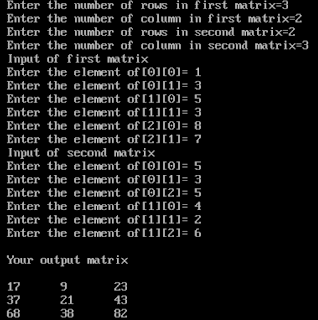
Program to calculate product of matrix
MATRIX MULTIPLICATION


Explanation


In the program we are performing multiplication of two matrix of order 3*2 and 2*3. The input of is taken as shown above. The multiplication is calculated as shown below:

i<3          j<3          k<2          c[i][j]          c[i][j]=c[i][j]+a[i][k]*b[k][j]
0             0              0               0               c[0][0]=c[0][0]+a[0][0]*b[0][0]=0+1*5=5
                               1               5               c[0][0]=c[0][0]+a[0][1]*b[1][0]=5+3*4=17      
               1              0               0               c[0][1]=c[0][1]+a[0][0]*b[0][1]=0+1*3=3 
                               1               3               c[0][1]=c[0][1]+a[0][1]*b[1][1]=3+3*2=9  
               2              0               0               c[0][2]=c[0][2]+a[0][0]*b[0][2]=0+1*5=5 
                               1               5               c[0][2]=c[0][2]+a[0][1]*b[1][2]=5+3*6=23.


The process continues till i=2 and calculates all elements of product matrix of order 3*3. We obtain the result and it is printed on the screen. 


Addition of two matrices of order m * n in C++

Addition of matrices

The addition of two matrices of the same order is obtained by the addition of corresponding elements. Only the matrices of the same order can be added and the sum also has the same order (as that of the matrices which are added). Example:


Sum of two matrices
MATRIX ADDITION


Write a program in C++ to input two matrices of order m*n and display its sum.

In this program, we input two matrices by using nested for loop and store the matrices with the help of two-dimensional array. Then we perform the addition of their corresponding elements. Finally, we display the sum of two matrices using another nested for loop.

A two-dimensional array is those array which contains a pair of the square bracket. A two dimensional is declared as:
datatype a[m][n];
Where m is the number of rows and n is the number of columns.

The array a[2][2] contains four elements which are: a[0][0] , a[0][1], a[1][0], a[1][1].


Program

#include<iostream.h>
#include<conio.h>
void main()
{
int a[20][20],b[20][20],c[20][20],i,j,m,n;
clrscr();
cout<<"Enter the number of rows of the matrix=";
cin>>m;
cout<<"\nEnter the number of colomns of the matrix=";
cin>>n;
if(m>20||n>20)
{
cout<<"\nInvalid size of the matrix";
goto x;
}
cout<<"\nEnter values for first matrix:\n";                             

for (i=0;i<m;i++)                                                                    //Input of first matrix    
{
for(j=0;j<n;j++)
{
cout<<"Enter the element a["<<i<<"]["<<j<<"]= ";
cin>>a[i][j];
}
  }
cout<<"\nEnter values for second matrix:\n";                         

for (i=0;i<m;i++)                                                                    //Input of second matrix
{
for(j=0;j<n;j++)
{
cout<<"Enter the element b["<<i<<"]["<<j<<"]= ";
cin>>b[i][j];
}
}

for (i=0;i<m;i++)                                                                    //Summation of two matrices
{
for(j=0;j<n;j++)
{
c[i][j]=a[i][j]+b[i][j];
}
}

cout<<"\nYour result is:\n";                                               
for (i=0;i<m;i++)                                                                   
//Printing of sum
{
for(j=0;j<n;j++)
{
cout<<c[i][j]<<"\t";
}
cout<<endl;
}
x:getch();
}


Output

Program to add two matrices
MATRIX ADDITION


Explanation

In the program, we performed the addition of two matrices of order 2*2. The input is done using
nested for loop as it assign the value of the elements (a[0][0], a[0][1], a[1][0], a[1][1] ) individually.The addition is performed as follows:

i(<2)          j(<2)                      c[i][j]=a[i][j]+b[i][j]
                0                          c[0][0]=a[0][0]+b[0][0]=4+4=8     
                    1                          c[0][1]=a[0][1]+b[0][1]=3+3=6
                0                          c[1][0]=a[1][0]+b[1][0]=2+5=7
                    1                          c[1][1]=a[1][1]+b[1][1]=6+9=15.

In this way, we obtain the addition of two matrices and it is displayed using nested for loop.


Tuesday, 25 September 2018

Printing n prime numbers in C++

Prime numbers

Prime numbers are those numbers which are divisible by and itself only. A prime number doesn't have any pattern but can be determined by the division process.
      E.g. 2,3,5,7,...etc. (i.e. 7 is divisible by 1 and itself only, so it is a prime number.)
Zero and one (0,1) are neither prime nor composite numbers

Write a program in C++ to input a number from the user and print all the prime numbers up to it.

We need to input a number from the user and print the prime numbers up to that number. We will use a nested for loop to print the numbers. For loop is considered in such a way that each number is divided by all positive integer greater than 1 and less than the number(1<Divisor<Number). If any particular number is not divisible by any divisor, then it is considered a prime number and is printed.

The break statement is jump control statement which transfers the control out of the loop (i.e. the loop terminates). The break statement only terminates the loop which contains the statement.
Syntax:
                  break;

Program


#include<iostream.h>
#include<conio.h>
void main()
{
int a,b,c=0,n;
clrscr();
cout<<"Enter the number upto which you want to print the prime number=";
cin>>n;
for(a=1;a<=n;a++)
          {  
                  for(b=2;b<a;b++)
                 {
                 if(a%b==0)
                 break;
                 }
          if (b==a)
          cout<<a<<endl;
          }
getch();
}

Output

Program to print prime numbers
PRINTING N PRIME NUMBERS


Explanation

In the above program, our input is 19(i.e. n=19). So the nested for loop will be executed as follows:

a        a<=19               b           b<a                      a%b                       b==a                  Action
1        True                  2           2<1 is false                                          1=2 is false
2        True                  2           2<2 is false                                          2=2 is true          2 is printed.
3        True                  2           2<3 is true           3%2=0 is false          
                                   3           3<3 is false                                          3=3 is true           3 is printed.
4        True                  2           2<4 is true           4%2=0 is true                                      Break.
5        True                  2           2<5 is true           5%2=0 is false                  
          True                  3           3<5 is true           5%3=0 is false   
          True                  4           4<5 is true           5%4=0 is false   
          True                  5           5<5 is false                                          5=5 is true          5 is printed.  

The process is continued till a=19. The required prime number get printed on the screen.                                


Checking whether a number is Armstrong or not in C++

Armstrong numbers

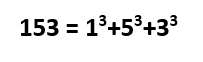
Armstrong numbers are those multi-digit numbers in which the sum of cube of each digit of the number is equal to the number itselfThe four Armstrong number are 153, 370, 371, 407. Observe the example below:

Checking Armstrong number in C++


Write a program in C++ to input a multi-digit number from the user and check whether it is Armstrong or not.

We will input a multi-digit number from the user. Then we will extract the last digit of the number one by one using mod(%) operator. We will calculate its cube and add it to a new variable. Then using slash(/) operator we will remove the last digit. Then a new digit is extracted again and this process continues till the input number is reduced to zero. Also, see the program to calculate the sum of digits of a multi-digit number for a proper understanding of this program.


Program


#include<iostream.h>
#include<conio.h>
void main()
{
int a,b,sum=0,c;
clrscr();
cout<<"Enter a multi digit number=";
cin>>a;
c=a;
while (a!=0)
{
b=a%10;
sum=sum+(b*b*b);
a=a/10;
}
if(sum==c)
cout<<"\nThe number is Armstrong";
else
cout<<"\nThe number is not Armstrong";
getch();
}


Output


Program to check Armstrong number in C++.
CHECKING OF AN ARMSTRONG NUMBER


Explanation


In the program, the input 153 was stored in variable a and c. The value of a was processed in a loop whereas the value of c was left for comparison after the loop. The while loop was executed as follows:

a                       b=a%10                    sum=sum+(b*b*b)                a=a/10
153                   b=153%10=3            sum=0+(3*3*3)=27                a=153/10=15
15                     b=15%10=5              sum=27+(5*5*5)=152            a=15/10=1
1                       b=1%10=               sum=152+(1*1*1)=153          a=1/10=0
0

Since the value of a is zero(i.e. a=0) the while loop terminates. Now the if statement compares the value of sum and c. If they are equal then the number is Armstrong. In above program 153 is an Armstrong number, so the respective message was displayed on the screen.


Monday, 24 September 2018

Menu driven program for arithmetic operation in C++

Menu driven program

A menu driven program is a program in which the menu is displayed and the operation is performed according to it. A menu with all the possible operation is displayed. The user's choice according to the menu is taken and the corresponding operation is performed.


Write a program in C++ to input two numbers from the user. Calculate the addition, subtraction, multiplication or division of two numbers according to the choice of the user.


You can perform the following operations:
1. Addition
2. Subtraction
3. Multiplication 
4. Division
5. Exit

We need to input two numbers and display the above menu. Then we will input the operation the user wants to perform. Using the switch case we will perform the arithmetic operation for respective choices and the result will be displayed.


Program


#include<iostream.h>
#include<conio.h>
void main()
{
int a,b,c,choice;
clrscr();
cout<<"Enter 1st number=";
cin>>a;
cout<<"Enter 2nd number=";
cin>>b;
cout<<"\nYou can perform the following operations:\n";
cout<<"1.Addition\n";
cout<<"2.Subtraction\n";
cout<<"3.Multiplication\n";
cout<<"4.Division\n";
cout<<"5.Exit\n";
cout<<"\nEnter your choice=";
cin>>choice;
switch(choice)
{
case 1:
c=a+b;
cout<<"\nAddition="<<c;
break;
case 2:
c=a-b;
cout<<"\nSubtraction="<<c;
break;
case 3:
c=a*b;
cout<<"\nMultiplication="<<c;
break;
case 4:
c=a/b;
cout<<"\nDivision="<<c;
break;
case 5:
cout<<"\nThank you";
break;
default:
   cout<<"\nInvalid choice";
}
getch();
}

Output


Program to create a menu driven calculator
MENU DRIVEN PROGRAM FOR ARITHMETIC OPERATION


Explanation


We entered two numbers 5 and 3 (i.e. a=3 and b=5). Then we entered 3 as our choice, so the multiplication of two input numbers (i.e. a*b = 3*5) was performed. Then the result (i.e. c=15) was displayed on the screen.


Printing Fibonacci series with n terms in C++

Fibonacci series

Fibonacci series is an infinite sequence of positive integers in which any number is the sum of two preceding (previous) numbers, except for the first two numbers. The series is as follows:

0, 1, 1, 2, 3, 5, 8, 13, 21, 34, 55, 89, 144, ......so on.


We can observe that each number except the first two (i.e. 0 and 1) is the sum of the previous two numbers.

Mathematically,

Printing Fibonacci series with n terms
FORMULATION OF FIBONACCI SERIES


Write a program in C++ to print Fibonacci series with n number of terms.


As the first two numbers do not satisfy the generalization, so we have to print them separately. They will not be included in the formulation. The other numbers will be printed by the formulation. The first two numbers will be initialized and printed directly as:
First number = 0
Second number = 1
Print the first number.
Print the second number.

Inside the loop, the following operation will occur:
                         Third number = First number + Second number
                         Print the third number.
                         First number = Second number
                         Second number = Third number
The for loop will run as long as the condition is true to give the required output. 


Program

#include<iostream.h>
#include<conio.h>
void main()
{
int a=0,b=1,c,sum,i;
clrscr();
cout<<"Enter the numbers of terms you want to print=";
cin>>c;
c=c-2;
cout<<"Your fibonacci series is\n";
cout<<a<<"\n";
cout<<b<<"\n";
for(i=0;i<c;i++)
{
sum=a+b;
cout<<sum<<"\n";
a=b;
b=sum;
}
getch();
}


Output


Program to print Fibonacci series
PRINTING OF FIBONACCI SERIES WITH N TERMS


Explanation


In the program, the user wants to print 10 (value of c) terms. The first two terms (i.e. 0 and 1) are already printed, so the loop is executed (value of c-2) times. The for loop is executed as follows:

i            a            b          sum=a+b                  Output screen              a=b             b=sum
0           0             1          sum=0+1=1                 1                                     a=1              b=1
1           1             1          sum=1+1=2                 2                                     a=1              b=2
2           1             2          sum=1+2=3                 3                                     a=2              b=3
3           2             3          sum=2+3=5                 5                                     a=3              b=5
4           3             5          sum=3+5=8                 8                                     a=5              b=8
5           5             8          sum=5+8=13               13                                   a=8              b=13
6           8             13        sum=8+13=21             21                                   a=13            b=21
7           13           21        sum=13+21=34           34                                   a=21            b=34
8 (which is not less than 8, so the execution stops.)

In this way, 0 and 1 (first two terms) are printed directly and the remaining is printed by for loop as shown in the table.